New & Key Features
This page gives a feature-based overview of what 64Pad Explorer can do today. For detailed version notes, see Update History.
The Four Main Modes
- Scale: Choose a key and scale, then view the note layout on the 64 pads.
- Chord: Build chord shapes from root, quality, tension, and voicing.
- Input: Play notes and detect chord names and candidates in real time.
- Perform: Save chords and perform them from a 16-slot layout.
Build and Detect Chords
- Detect chord names, notes, degrees, and candidates from what you play.
- Type a chord name and view its 64-pad shape.
- Work with tensions, inversions, slash chords, UST, and quartal voicings.
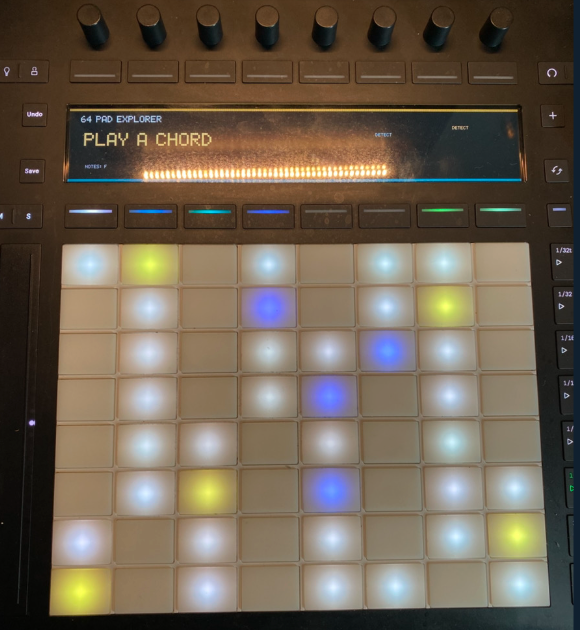
Control with Push 3
Push 3 is available through both the Browser and Desktop editions.
- Browser: In supported environments, explicitly connect Push 2 / 3 from Chrome over HTTPS for display output, LED lighting, and control. Browser permissions are required.
- Desktop: Use Push 3 through the native MIDI / device path without browser permission requirements. Desktop offers the lowest latency of the three editions.
Both paths can use Push 3 with 64Pad Explorer, but their connection method and supported environments are not identical.
- Pad lighting
- OLED chord and candidate display
- Root, quality, tension, and voicing selection
- TASTY / STOCK / Guitar / Double Stop switching
- Capture, Perform, and MIDI Export controls
TASTY / STOCK / Guitar
- TASTY: Find practical voicings from the top note.
- STOCK: Browse common jazz-piano voicings.
- Guitar: Show practical guitar shapes on the 64-pad layout.
Memory / Perform / MIDI Export
Save chords, arrange them in Perform, and export saved chords as MIDI.
Double Stop
Double Stop mode shows two-note harmony shapes such as 3rds, 4ths, and 6ths in Scale mode. When multiple positions are available, use Space or Push 3 press controls to cycle candidates.
UST / Quartal Voicings / Circle of Fifths
Chord detection also helps with UST and quartal voicing interpretation. The circle of fifths view supports diatonic chords, parallel minor, secondary dominants, and available scales. Available Scale rows show the chord-scale name, degrees, parent-scale relationship such as viiø7 / F Major, and available tensions.
Which Version Should I Use?
| Version | Best for |
|---|---|
| Browser | Play without installing or opening a DAW. Use the built-in sound source and, in supported environments, explicitly connect Push 2 / 3. |
| Desktop | Practice without a DAW, use Push 3 / MIDI through the native desktop path, and load VST3 / AU instruments. |
| VST3 / AU | Check 64-pad positions inside your DAW. |
Next Pages
Launchpad Pro MK3 (1.9 RC)
The browser and Standalone app reflect on-screen hand positions on pad LEDs and provide five configurable colors. Only Pro MK3 Programmer mode is in scope; physical hardware remains untested. In Chrome allow Web MIDI SysEx, select the Pro MK3 MIDI input or All, and use one unambiguous matching output detected automatically; DAW / DIN ports are excluded. Standalone detects an unambiguous pair automatically. Avoid sharing the device with another app or tab. The MIDI guide currently falls back to Japanese.