About 64Pad Explorer
Beta (= work in progress): This manual is being updated. Some sections may be incomplete or contain errors.
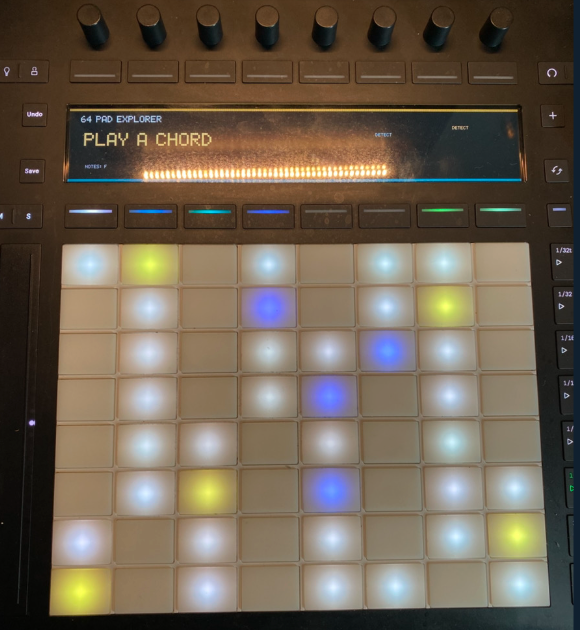
64Pad Explorer is a tool for seeing, playing, and understanding scales, chords, and voicings on a 64-pad layout. It connects keyboard and guitar knowledge to the pad layout, helping you learn harmony and scales. Available in three forms: Browser, Desktop version, and VST3 / AU plug-in.
What You Can Do
- Real-time chord detection and display (including tensions and inversions)
- Text input for chord voicings, with available-tension checking
- Translation between keyboard / guitar / pad (chords played on one instrument are reflected on the others)
- Practical voicing display (TASTY = reverse lookup from the top note, STOCK = jazz piano standards)
- Guitar / bass fretboard integration (
To Padreflects practical guitar shapes onto the 64-pad layout) - Simultaneous display of multiple positions
- Music analysis support (parent scale, parallel minor, secondary dominant)
- Substitute chords and circle-of-fifths learning
- Chord memory (save played chords and use them in performance)
- Multilingual UI
- Push 3 support in Browser and Desktop (explicit browser connection in supported environments)
Who It's For
- People who don't play an instrument but want to learn chords and scales on a pad
- Those who want to study theory but found notation- or keyboard-centric learning unapproachable
- Pad owners who aren't sure what to study next
- Non-keyboardists who want to master a sequencing tool or harmonic instrument
- Beatmakers who find chords difficult
Browser, Desktop, and Plug-in: How They Differ
A free version that runs in your browser. It includes a physical-modeling electric piano sound source for Soul, Funk, and Jazz Funk (with tremolo, reverb, and amp), so connecting a MIDI device is all you need to play. No installation or DAW is required, and the Browser edition stands on its own as a playing and learning environment. In supported environments, you can explicitly connect Push 2 / 3 from Chrome for display output, LED lighting, and control. Browser permissions are required, and identical support across all browsers and operating systems is not implied. Some additional features are available for HPS members.
Runs without launching a DAW. You can host VST3 / AU instrument plug-ins and play. Push 3 and other MIDI devices use the native desktop path without browser permission requirements. Desktop offers the lowest latency of the three editions.
Loads as a plug-in inside your DAW. Even in a DAW without pad display, you can confirm 64-pad positions on your computer screen. The plug-in version does not support features such as Push 3 display output or direct control from its hardware buttons.
Push 3 Support
Push 3 works through two different paths.
- Browser: In supported environments, explicitly connect Push 2 / 3 from Chrome over HTTPS for display output, LED lighting, and control. Browser permissions such as WebUSB are required; identical support across all browsers and operating systems is not assumed.
- Desktop: Use Push 3 through the native desktop MIDI / device path without browser permission requirements. Desktop offers the lowest latency of the three editions.
- VST3 / AU plug-in: Features such as Push 3 display output and direct control from its hardware buttons are not supported.
Features Unlocked in Desktop / VST3 / AU
Purchasing 64Pad Explorer Desktop gives you access to practical voicing features that are member-oriented in the Browser version.
- TASTY (top-note classified voicings)
- STOCK (piano cliché voicings)
- Genre-specific guitar voicings
For HPS Members
HPS members can use the same features on the Browser version. The Desktop edition is also distributed free of charge to members.
Price and Purchase
- Price: 50 USD (Gumroad, one-time purchase)
- Distribution: Mac PKG + Windows zip (Desktop app + VST3 included)
- Intel Mac support is planned to end after the v1.6.x series
- HPS members: free with coupon code
About the Windows Version
A Windows build is included, but current verification focuses mainly on the Mac version. Individual support for Windows environments is limited.
Try the Browser Version
64Pad Explorer also works as a standalone Browser edition. Connect a MIDI device and play with the built-in physical-modeling electric piano sound source for Soul, Funk, and Jazz Funk. In supported environments, you can also explicitly connect Push 2 / 3 from Chrome for display output, LED lighting, and control.
What is HPS
HPS (= Hardcore Pad Style) is a membership program for understanding music structurally and learning to perform it on the 64-pad layout. 64Pad Explorer was originally developed as a learning-support tool for HPS members.